

Key Takeaways
- The best payroll software for a small business is the one that fits your worker mix, pay schedules, compliance needs, and how you expect the business to grow.
- At a minimum, your payroll system should automate calculations, support direct deposit, handle payroll tax filings and payments, integrate with your accounting system, and allow employees access to their own payroll information.
- Compliance, ease of use, reporting, and security matter just as much as price does. Cheap software can become expensive very quickly when it creates errors or delays.
- Before you commit, test your top options with a demo or trial and make sure the day-to-day workflow makes sense for you and your team.
Do more of your workers want to know more details about their paychecks?
Are you ever late issuing paychecks?
Are you struggling to keep up with filling out tax forms?
Is manually calculating payroll eating up your valuable time?
The right payroll software on hand can make all of that easier.
But which payroll software is the right fit for your Newtown Square business? Let’s walk through a few things worth considering…
Why do you need payroll software?
Payroll software automates your business’s payroll process by calculating wages, deductions, employer taxes, and benefit withholdings, then helping make sure your employees are paid.
At its best, it takes a repetitive, detail-heavy process and makes it far more dependable.
It also gives you flexibility that older payroll processes often lack. You may:
- Need direct deposit
- Want employees to access their own pay stubs
- Need payroll to sync with your bookkeeping or accounting software
- Have a remote team
- Have contractors in addition to employees
Good payroll software gives you room to handle all of that without having to rebuild the process every time your Pennsylvania business changes.
There’s also the practical cost issue. Hiring internal payroll staff or piecing together manual systems can work for a while, but it rarely scales cleanly.
Subscription-based payroll software usually gives you more predictable costs and, for many small businesses, a better balance between capability and overhead.
And beyond just “running payroll,” the better systems now connect payroll with time tracking, HR functions, employee records, reporting, and accounting.
What are the essential features to look for in payroll software?
What actually makes a payroll system worth paying for? Here are the features to look for that will have the greatest impact on your day-to-day operations:
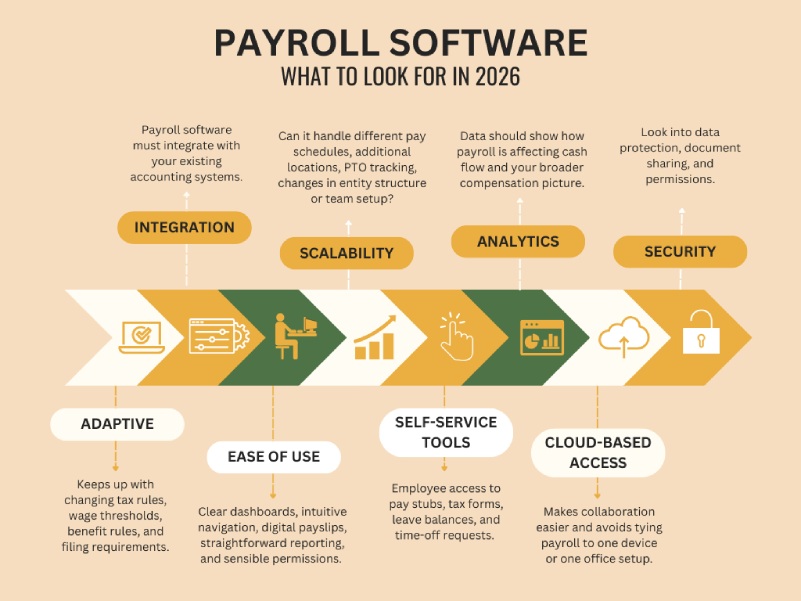
1. Software that keeps up with changing regulations
Tax rules, wage thresholds, benefit rules, and filing requirements all change somewhat frequently. And if your payroll software doesn’t keep up, you’re the one left dealing with the consequences.
Because noncompliance can lead to penalties, interest, correction filings, and unnecessary back-and-forth.
A strong payroll platform should update as regulations change, not force you to rebuild settings from scratch every time there’s a tax or wage update. That automatic updating saves time and helps reduce the chance that something slips through because you were busy running the business.
2. Integration with your accounting system
When your payroll software integrates with your accounting platform, you cut down on duplicate entry and reduce the chances of your books drifting away from what actually happened in payroll.
A good integration will automatically create journal entries for each pay run, assign expenses and liabilities correctly, and move the data where it needs to go.
When payroll and accounting talk to each other, labor costs, payroll tax liabilities, contractor payments, benefits, and timing of cash outflows become easier to track. Which means you can spot trends faster and make better decisions.
3. Ease of use for both you and your team
Can you run payroll without hunting through six menus? Find reports quickly? Review time, leave, and approvals without bouncing around the system? Can a manager or delegated staff member do their part without needing constant help?
Your payroll software should make common tasks easier. So look for clear dashboards, intuitive navigation, digital payslips, straightforward reporting, and sensible permissions.
4. Scalability and flexibility
Payroll systems are painful to switch once they’re embedded in your processes, so it’s worth thinking ahead.
Make sure the software can handle…
- Adding more employees
- Different pay schedules
- Additional locations
- PTO tracking
- Benefit deductions
- Changes in entity structure or team setup
Also, many businesses now have a mix of hourly employees, salaried employees, tipped workers, contractors, and remote staff. Your payroll system should be able to accommodate that reality without forcing awkward workarounds.
5. Employee self-service tools
Employees having access to their own pay stubs, tax forms, leave balances, and time-off requests through a self-service portal means a lot less administrative friction for you.
For employees, self-service is convenient. For the business, it improves flow. It also reduces interruptions related to payroll, which is helpful when you’re trying to keep your attention on higher-value work.
6. Reporting and analytics
Detailed payroll reporting can show:
- Wage expense trends
- Tax liabilities
- Benefit contributions
- Contractor payments
- Overtime patterns
- Year-to-date totals
Some systems also help track things like retirement plan contributions, employer matches, and contractor reporting.
With that data, you can see how payroll is affecting cash flow and what your broader compensation picture looks like.
7. Cloud-based access and security
Cloud-based payroll software has largely become the standard. It makes collaboration easier and avoids tying payroll to one device or one office setup.
Also, payroll contains highly sensitive information: addresses, Social Security numbers, bank details, wage data, and benefit information.
So make sure to ask direct questions about security when you’re in a demo or a trial period for a certain software:
- How is data protected?
- What permissions can be limited?
- How are documents shared?
- What happens if there’s a breach?
A payroll provider should be ready to answer those questions clearly.
How to choose payroll software for your business
Knowing how to choose payroll software is easier when you approach it in sequence instead of trying to compare every platform at once.
Step 1: Determine your payroll needs
Start with your actual business, not the software.
How many people are on payroll today, and how many do you expect in the next year or two? Are they employees or independent contractors (or both)? Do you have hourly workers, salaried staff, tipped workers, or multiple pay rates? Will you be running weekly, biweekly, semimonthly, or monthly payroll?
Location matters too. If your team works in more than one state (or country), that introduces another layer of complexity.
Then think about your other systems. What accounting software do you use? Do you need features like time tracking, PTO tracking, benefits administration, HR tools, workers’ compensation support, or retirement contribution tracking?
Step 2: Establish a budget
Consider the full cost of the software, which includes:
- Monthly base fee
- Per-employee charges
- Setup fees
- Charges for tax filing or year-end forms
- Support or implementation costs
- Add-ons for time tracking, HR, or benefits
The cheapest option is not always the least expensive. If low-cost software creates cleanup work or filing problems, you may spend the difference elsewhere in time or professional help.
Step 3: Compare providers using your must-haves
Once you know what you need and what you can spend, make a shortlist of your top payroll software options.
Then go beyond the brochure language. Look at how implementation works and how long direct deposit takes. Look at what support is included versus upsold.
Read reviews with an eye toward recurring complaints (especially around customer service, setup issues, and tax filing problems).
Step 4: Review compliance and security closely
Again, your payroll provider should be able to keep pace with applicable tax and labor rules and support the filing obligations that come with payroll in your region.
It should also have a clear security posture around employee data and access controls.
This is one area where I would tell you not to settle for fuzzy answers. Be nosy.
Find out how often the system updates for regulatory changes and what support is available when a payroll tax issue arises. Ask how permissions work. Ask how data is encrypted or protected. Learn what happens if there is a system issue or security event.
Step 5: Use demos and trials before deciding
Once you’ve narrowed your options to two or three, test them.
A demo or trial can tell you things a feature list won’t.
For instance, whether the interface is intuitive, how easy reports are to find, and if someone on your team could use it without an unnecessarily long learning curve.
What’s the best payroll software for small businesses?
Of course, there’s no single best payroll software for every business. That depends on your setup, priorities, and budget.
However, there are a few options that are considered the overall frontrunners:
Gusto Payroll offers full-service payroll, automated payroll options, tax filings and payments, and employee-facing tools. It also includes HR-related features like onboarding and benefits administration.
It’s probably a strong fit if you want an approachable interface and a broader platform beyond just payroll.
QuickBooks Payroll is a strong contender if you already use QuickBooks Online. When your payroll and accounting are already in the same ecosystem, it can streamline setup, journal entries, reporting, and ongoing bookkeeping.
It also offers automated tax filing, direct deposit options, payroll reports, and employee self-service tools through its workforce portal.
ADP RUN is an option to consider if you want an established payroll provider with room to grow. It offers payroll features, employee access tools, app integrations, and the ability to move into larger ADP products as the business scales.
One tradeoff, though, is that pricing can be less transparent and some features may cost extra. So this is a platform where asking detailed pricing questions upfront matters.
What’s the cheapest payroll software for small businesses?
Cost might be the deciding factor for you as you’re thinking about how to choose payroll software (especially if you’re newer to running your business).
If that’s where you’re at, consider Patriot Payroll. It offers payroll and accounting products with additional features available for HR and time tracking.
One thing to watch is service level. Lower-cost plans don’t always include tax filing and depositing, so you want to be clear on what is included before assuming the platform is handling everything.
Or, if you run a very small business with basic payroll needs, Payroll4Free is an option to look into because of the no-charge entry point. It can calculate taxes, support check or direct deposit payments, provide employee access to documents, and generate reports.
Final thoughts
The payroll software you choose only affects your compliance, cash flow, bookkeeping, and day-to-day operations. AKA, the key pillars that keep your Newtown Square business standing.
What I’m saying is, choosing the right payroll software is no small thing.
So, if you want help getting a good look at all the factors in play before you take the leap, we’re here to talk:
FAQs
“Why should small businesses use payroll software instead of manual spreadsheets?”
Manual payroll is high-risk because it relies on you to remember every tax rate change and filing deadline. Payroll software automates wage calculations, tax withholdings, and filings, which significantly reduces human error. It also provides essential features like direct deposit and employee self-service portals, saving you hours of administrative work each month.
“What are the must-have features in a payroll service for 2026?”
Not sure how to choose payroll software? Look for these three non-negotiables:
- Automatic tax filing. The software should calculate, file, and pay your local, state, and federal taxes automatically.
- Accounting integration. It must talk to your bookkeeping software (like QuickBooks or Xero) to ensure your labor costs and liabilities are tracked accurately without double entry.
- Compliance updates. Your platform should automatically update to reflect new wage thresholds or tax laws so you don’t have to.
“How much does payroll software typically cost for a small business?”
In 2026, most providers use a “Base Fee + Per Employee” monthly subscription model. You can generally expect:
- Base Fee: $20 to $45 per month.
- Per Employee Fee: $4 to $12 per person.
- Total Average: A business with 5 employees typically pays between $50 and $100 per month.
“Can payroll software handle both W-2 employees and 1099 contractors?”
Yes, most modern platforms like Gusto and QuickBooks Payroll allow you to pay both from the same dashboard. The software will automatically generate W-2s for employees and 1099-NEC forms for contractors at the end of the year, ensuring you stay compliant with IRS reporting rules.
“Is cloud-based payroll software secure for sensitive employee data?”
Security is a top priority for reputable cloud providers. They use bank-level encryption and multi-factor authentication to protect Social Security numbers and bank details. Compared to keeping paper files in a cabinet or unencrypted spreadsheets on a laptop, a cloud-based system is significantly more secure and allows you to control exactly who has access to sensitive info.